Subscribe For Free Updates!

We'll not spam mate! We promise.

Showing posts with label General. Show all posts

Usefull Websites for Tech Life


Clip Converter is a free online media conversion application, which allows you to reocord, convert and download nearly any audio or video URL to common formats.

Are  you getting the speed you pay for? Our Promise Index™ and Ookla Speedtest help keep your ISP honest! You can help too and join over 250 million others like you who want to test or troubleshoot their Internet connection. What's your Speed?

AddMeFast is a network that will help you grow your social presence. We allow you to look and choose who you want to like/subscribe/follow/view and skip those who you are not interested in.

Online HTML Editor here you can write and see HTML in action.

Creating a Cool Facebook Timeline Cover for Fun or Business has Never Been Easier!
With our powerful editor, you can create an integrated looking between your Facebook cover and Profile picture without any Branding or advertisement watermark from us for free!

HitLeap is a Traffic Exchange, also known as an autohits service
We help you increase your website hits, rankings (Alexa, Google) and more.
Our affiliate program gives cash and traffic commissions of up to 50%.
www.hitleap.com

Marathi Changathi is a tool for marathi translation from english to marathi powered by google.


What is Phishing and How it’s Works?


We all listen about the phishing many times, but very less to know about it and  some of them have a little knowledge about the phishing. So they will infected to phishing and lost their personal details, username, password etc.


What is  Phishing?     

Phishing is a way of attempting to acquire sensitive  information by a fake page. Scammers will use such attacks to steal money and identities from many new victims around the world. The scammers often create a "look-a-like" webpage that is designed to resemble the target company’s official website.

Creat Your Own Website Free For 1 Year


        If You Have a Local Business in India,Then it’s Time to go online and Creat An Absolutely Free Website ...


Get India Business Online (indiagetonline.in) is an initiative by Google that allows you to create a professional services website for your business in just 15 minutes, for free.

This free package contains a .IN domain name, Website Hosting, and Email for 1 year.

domain-name
It will take some simple steps to publish your website via www.indiagetonline.in and be online to get inquiries online.

Just follow these steps-


3. Follow these simple steps mentioned on the Get Started page and click on 'Create my free website now' button.
This button will take you to HostGator.in website where you can choose your wish domain availability.
If your domain is available, 
click on NEXT.

4. Fill out your business information to apply for your wish website.
You get all this free for first year.
For the next year, you’ll have the option to renew your services with HostGator and there would be discounts too ..!!


Access any website without registering


Hey guys this is the warwolf and in this tutorial I will be telling you how to access website or forums with requires registration before viewing the topics. Just follow the simple steps described below.

1. Download a Firefox add on named  User Agent Switcher


2. Now go to Tools > Default User Agent  > User Agent Switcher > Options. You will find a window shown below.


3. After opening the it, click on New. After clicking on New button you will get another window like this, Shown in the image below.
4. Now in the description feild add :
crawl-66-249-66-1.googlebot.com
And in User Agent feild type :
Googlebot/2.1 (+http://www.googlebot.com/bot.html)
Now click on OK and again OK. User Agent Switcher window will be closed now
5. Now again go to Tools > Default User Agent, and select crawl-66-249-66-1.googlebot.com as your Default User Agent.
6. Now you Done ! Just open your favroite forum and start browsing without registering

Rec Studio 4 – Reverse Engineering Compiler & Decompile


REC Studio is an interactive decompiler. It reads a Windows, Linux, Mac OS X or raw executable file, and attempts to produce a C-like representation of the code and data used to build the executable file. It has been designed to read files produced for many different targets, and it has been compiled on several host systems.
REC Studio 4 is a complete rewrite of the original REC decompiler. It uses more powerful analysis techniques such as partial Single Static Assignment (SSA), allows loading Mac OS X files and supports 32 and 64 bit binaries.
Although still under development, it has reached a stage that makes it more useful than the old Rec Studio 2.
Features
  • Multihost: Rec Studio runs on Windows XP/Vista/7, Ubuntu Linux, Mac OS X.
  • Symbolic information support using Dwarf 2 and partial recognition of Microsoft’s PDB format.
  • C++ is partially recognized: mangled names generated by gcc are demangled, as well as inheritance described in dwarf2 is honored. However, C++ is a very broad and difficult language, so some features like  templates won’t likely be ever supported.
  • Types and function prototype definitions can be specified in text files. Some standard Posix and Windows APIs are already provided in the Rec Studio package.
  • Interactivity is supported, limited to definition of sections, labels and function entry points. Will need to improve it to support in-program definition of types and function parameters.
Although REC can read Win32 executable (aka PE) files produced by Visual C++ or Visual Basic 5, there are limitations on the output produced. REC will try to use whatever information is present in the .EXE symbol table. If the .EXE file was compiled without debugging information, if a program data base file (.PDB) or Codeview (C7) format was used, or if the optimization option of the compiler was enabled, the output produced will not be very good. Moreover, Visual Basic 5 executable files are a mix of Subroutine code and Form data. It is almost impossible for REC to determine which is which. The only option is to use a .cmd file and manually specify which area is code and which area is data.
You can download Rec Studio 4 here:
Windows – RecStudioWin.zipUbuntu – RecStudioLinux.tgz


NOTE: This Post iz Copied.  (http://www.hackersgroupofindia.in/)

Boost Torrent Speeds using UTorrent Turbo Booster


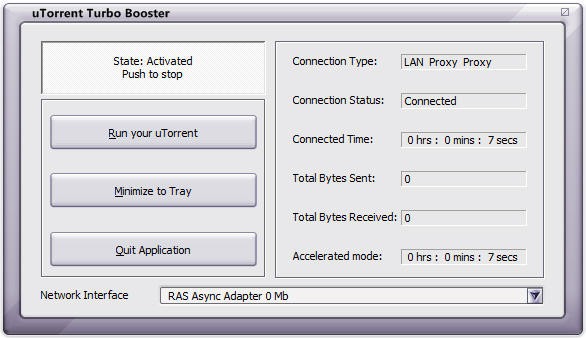
UTorrent Turbo Booster is a kind of plugin for the most popular p2p client called UTorrent which will improve speeds and functionality of your torrent application. Now this tool is designed for getting your speeds higher and making your downloads fast and much more stable by increasing seeds which are almost lost during the transaction. So now using this software you will be able to download your movies, songs and games at much higher speeds.

utorrent-turbo-booster


Download UTorrent Turbo Booster :

Well if you are really keen of getting this freeware utility for boosting your UTorrent downloads than you can download it from software informer website for free. You can also more in details about this software right on their website. So now have fun boosting your speeds and downloading awesome stuff.

How to Make IDM Full Version without Patching


So just check out the below trick on how to make IDM ( Internet Download Manager ) full version through HOSTS File Trick. The procedure is really easy to follow and you can make this happen just in few seconds.


Follow below steps :

1. Make sure you have installed the latest version of IDM if you do not have it you can download it from the official creators website.

2. Now after you have downloaded and installed the latest version just close the IDM and now go to start menu and make a search for Notepad.

3. Now right click on Notepad and than Run It As Administrator.
 
4. Now navigate to C: > Windows > System 32 > Drivers > etc. > Hosts.

5. When you are in the etc. folder you might not see any files their as you have click on show all files on the right hand side below.

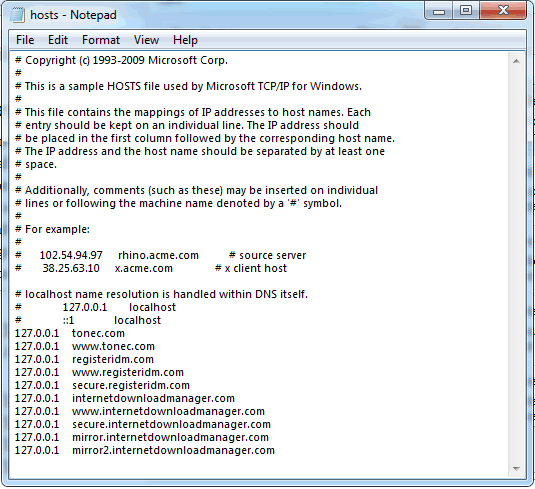
6. Now open the Hosts file and paste all the below lines like in the image.


127.0.0.1    tonec.com
127.0.0.1    www.tonec.com
127.0.0.1    registeridm.com
127.0.0.1    www.registeridm.com
127.0.0.1    secure.registeridm.com
127.0.0.1    internetdownloadmanager.com
127.0.0.1    www.internetdownloadmanager.com
127.0.0.1    secure.internetdownloadmanager.com
127.0.0.1    mirror.internetdownloadmanager.com
127.0.0.1    mirror2.internetdownloadmanager.com
 

 Hosts File 
  
7. So now as you can see in the above image how I have pasted all the lines @ the end of the Hosts file, you have to do same as above, now hit save.
8. Now when you have saved the HOSTS File you can simply enter any serials from below in your IDM Registration page.


RLDGN-OV9WU-5W589-6VZH1
HUDWE-UO689-6D27B-YM28M
UK3DV-E0MNW-MLQYX-GENA1
398ND-QNAGY-CMMZU-ZPI39
GZLJY-X50S3-0S20D-NFRF9
W3J5U-8U66N-D0B9M-54SLM
EC0Q6-QN7UH-5S3JB-YZMEK
UVQW0-X54FE-QW35Q-SNZF5
FJJTJ-J0FLF-QCVBK-A287M


9. Now enjoy your full version IDM without purchasing or patching its totally genuine and totally legal, you can update and it will still work like a charm so if you still have any queries than make sure to comment below.

The Onion Routing - highly anonymous


We all many times use proxies for staying anonymous on internet.


 Lets quickly check out , what we are actually doing while using proxies. We first connect to a proxy server which brings resources requested by us from the web server.
                                                          
Thus a proxy server hides our identity  by acting as an intermediary between us and the web server that we are accessing. You might want to read detailed post on proxies here.
Suppose we break into a server using a proxy server thinking that we are anonymous. But what if owner
of web server  starts enquiring about the clients connecting to it using the proxy server  and it is possible that owners of proxy server might   reveal our identity. This means we cant actually rely on proxy servers for being anonymous online. Here comes the concept of THE ONION ROUTING (TOR) into picture. By using this , the client traffic is supposed to be passed from three different servers or nodes before reaching to actual web server. It may randomly take any path through any three nodes. 

                      
Lets consider it has taken path shown by green arrows. Now

* Node 1 knows only actual origin(client) but not actual destinantion(web server).
*Node 5 neither knows actual origin nor actual destinantion.
*Node 9 knows actual destination but not actual origin.

Thus no one exactly knows which client is accessing which web server. So it is highly anonymous.

Installing and Using TOR.

Step 1. Download the TOR client from here and run the setup .
 

Note: You need to install a Mozilla firefox add on which is included in package you have downloaded to use Tor.


Step 2. Open the 'Vidalia Control Panel' from the task bar and Click on 'Start Tor'.
                        
Step3. Now open Mozilla Firefox browser, single click on red highlighted 'Tor Disabled' on right corner of browser and it will turn to green highlighted 'Tor Enabled'.

Now just log on to 'www.whatismyip.com' and you will see your new public IP address that will keep changing after an interval of time according to the path randomly taken by web traffic through three different nodes.


NOTE: Guys This Post is Copied From 'Www.ExploreHacking.Com'

Remote Keylogger - configure and use


Keyloggers are the best to spy upon anyone but many beginners find problem in using remote keyloggers . So in this post , I will be showing you the same.Remote keyloggers are very easy to use in comparison to trojans where the concepts like IP addresses, port forwarding are involved.  I highly recommend you to read the basics of keyloggers here . 


Requirements :-
1. Download a free remote keylogger 'Ardamax' with its serial key here. Password:explorehacking.com. Antivrus might detect it as a virus but dont worry.

2. Signup at any webhosting site supporting FTP (file transfer protocol) and note down your ftp host name. 
For example , I have signed up at www.my3gb.com and ftp host name is  username.my3gb.com . 

We are actually gonna create an executable(exe) file, which would be given to victim and he is supposed to run it. The keylogger would be installed on his computer and we would be getting automatically keylogs/screenshots in our web hosting site ftp account. 

I have added the self-explanatory pictures, follow them.


After entering registration key, click on Remote Installation
option . If it still says that its  unregistered version, restart computer.


Keylogger would run invisibly on victim's computer. Victim have would have to
press Ctrl+Shift+Alt+H and enter the password you have set to make it visible.


FTP hostname may be different for different web hosting sites. Mostly it is username.webhostingsite.com . You can specify any remote folder in which you wish to get logs. After filling all details, click on 'Test' and you would get any test file to make sure that  information you filled is valid and FTP connection is okay.


 You can change icon of exe file (keylogger engine) if you wish
 Just go through the Summary information and click finish.

So you have got an exe file which is detectable as a virus by antiviruses. Now use social engineering to make victim to click on this exe file and hopefully you would start getting the keylogs and screenshots in your account. You cant send it as an attachment in email ID. The good way is to uplaod it on any uploading site and give him the dowloading link.


Have fun :)


NOTE: Guys This Post is Copied From  (Www.ExploreHacking.Com)
 

Trojan Horse | RAT | Configure and Use | Tutorial- Part 2


Just go through the Part 1 which includes the basics of  Trojan Click here. This tutorial is about configuring and using a trojan. There are many trojans available on internet for free. Some popular ones are Beast, Pro Rat, Netbus , Back Orifice, Girlfriend, Sub 7. I will be using Pro Rat in this tutorial.

Requirements


1. Prorat- Click here to download Trojan Prorat.
2. Hostname  -  Your IP address would probably be dynamic that it keeps changing everytime you disconnect and reconnect. You need a host name which always automatically keep pointing to your changing IP. Follow these steps -:

1. Log On to www.no-ip.com and register for an account.
2. Go to Hosts/Redirects -> Add Host and choose any free available hostname. Do not change any other option and simply click on Create Host.

3. Downloading and install their DNS update client available here http://www.no-ip.com/downloads.php Run it and enter your credentials. Update your host name and save it.
4. Lets check whether your IP has been associate with chosen host name or not. Go to command prompt and type 'ping yourhostname' (without quotes) , hopefully it should reply with your IP address.

Tutorial for configuring Trojan.


1. Open prorat.exe that you have downloaded.
2. Click on Create  and then Create ProRat Server


 3.  Enter your host name in the ProRat Notification field as shown. Uncheck all other options.

4. Click on general settings Tab and have a look at server port,password, victim name. Remember these things.Check out and configure other options as per your need. You can bind server.exe with any genuine file, change its icon etc.
5. Finally click on create  server and now its ready to be sent to victim.  Once victim installs it, it would automatically disable antivirus/firewall.

Modes of sending-: 
You must be thinking of sending this server.exe to victim through an email as an attachment but unfortunately you cant do so. The good option is  to upload it on any uploading site like mediafire.com and give downloading link to victim.

What after victim has run the server part ?


1.Click on ProConnective Tab and start listening to connections. Allow firewall if it asks you to open a port.
2.You will start listening to connections, I mean you will get a notification as shown when victim would be online.


Note: If you know victim is online and still its not listening to any connections. Trace victim's IP,enter in IP field and hit connect. But its gonna work only if he is not behind any network and directly connected to internet. If you dont know how to trace IP, mention in comments.

What after successful connection ?

After you have managed to connect to victim's machine. There are numberless interesting things to do. I leave this part on you.  Have Fun.

How to make it undetectable from antivirus ?
Though there isn't any hard and fast way to make it fully undetectable from all antiviruses. The real way to do it is modify the source code of open source trojans available. Its very challenging job. There are many crypters which claim to make it undetectable but unfortunately hardly one out every hundred works. I would try to write next article on the same.


Contermeasure against Trojans -
The obvious coutermeasure against trojans is that do not accept downloading links blindly. Keep your antivirus up to date.

Detecting and removing Trojan -
Though trojan once installed is very hard to remove . It would hide itself from the Task Manager . Install Process Explorer and it would hopefully show you all process running including trojan. Kill the process and remove it. One good thing is to carefully check the open ports and services running through 'netstat' command. Anyways , the best option is to reinstall the windows.


Feel free to ask  the queries in comments :)


NOTE: Guys This Post is Copied From  (Www.ExploreHacking.Com)

Trojan Horse (Basics) - Part 1


Have you watched movie Troy ? okay lets leave . Have your wallpaper ever changed automatically ? Have the programs ever started without your initiation ? Have the browser opened unexpected websites automatically ? Simply have you ever felt that someone else is controlling your computer ? NO ?
Congrats, you probably haven't been a victim of trojan yet :).

A trojan horse is a remote administration tool(RAT). This is some thing extremely dangerous.  A trojan gives the full control of victim's PC to the attacker. 
 A trojan has two parts . One is client part (Control Panel) and other is server part (meant to be sent to victim).

The basic methodology of using a trojan is as follows:-

1. Attacker creates an executable file of size in kbs. This  is  server part of trojan and mostly called as server.exe

2.Attacker might hide this server.exe behind any genuine file like a song or image. Attacker gives this file to victim and victim is supposed to double click on it.

3.As victim run that server part , a port on victim's computer gets opened and attacker can control his PC sitting remotely in any part of the world through the control panel(client part). Attacker can do anything with victim's computer remotely that victim himself can do on his computer.

Note: Now I am assuming that you know a little bit about IP addresses that is lan/internal/private and wan/external/public IP.
Two different methods of working of Trojan.

1. Direct Connection : In this method, after the server part has been installed on victim's machine, the attacker enters the public IP address assigned to victim's computer for making a connection to it. But limitations of direct connection is that public IP address is most probably dynamic and gets changed everytime one disconnects and reconnects. So attacker needs to find out IP address of victim each time.Moreover the incoming connection like this is usually restricted by firewall.
The main limitation of direct connection is that you can not access the victim who is behind a router or a network beacuse victim's machine is not assigned public/external/wan IP. It is only assigned private/internal/lan IP which is useless or meaningless for computers outside that network.The wan IP belongs to his router.

It doesnt matter how attacker is connected to internet. Attacker can be connected to internet any of three means.


Victim is behind a router in this case. (havent inserted the picture of victim behind a network, imagine that )
2. Reverse Connection: In this method, attacker enters his own IP address in server part while configuring it .So when the server part is installed on victim's computer, it automatically makes connection with client part that is attacker. Also the firewall in victim's machine would not restrict to outgoing connections. Problem in this case is same that attacker's IP is also dynamic. But this can be over come easily. Attacker actually enters a domain name in server part which always points to his dynamic IP.

Reverse connection can bypass a router or a network.


You might be confused at this point. Kindly mention your queries/doubts in comments.


NOTE: Guys This Post is Copied From  (Www.ExploreHacking.Com)

Transfer Files From Browser To Browser Without Using FTP Client


                                https://blogger.googleusercontent.com/img/b/R29vZ2xl/AVvXsEhYe6NuOqqJPsvae2GZg0moCuLhOBl9iOGi97VZcGimoPRI2OTyLJoWS2KPOcEHJiKj0GSPpcffqhtsRsDWT1fljrJrOJMErh5mVYoNgJZBpaY5gX3DJpA5yHkDfEaactgYXoMBY2TTa44/s1600/GoAnywhere_Managed_File_Transfer.jpg


Hi folks...
Guys if you want to send your files from one computer to another computer, you always use Gmail or any other uploading websites. But now you can be transfer files from one computer to another using only Browser. When I am saying only browser, i meant without using any FTP client. So here we go...


2. Click on “Browse” and select file that you like to send

3. Now share the unique URL with your Friend whom you want to send the file.

4. If you need extra protection then you can “Password” protect the file?

5. When receiver will start downloading the file it will first load on sender’s RAM.
(There on the data will fetch on from sender’s ram to receivers local drive.)
Important Note: Senders Browser must stay open during entire file transfer)

6. Now download will start . Receiver can save the file into their local drive.

                                                http://2.bp.blogspot.com/-rHDUWeC88wU/TqLZHTLEH8I/AAAAAAAAAAc/VDLFFssQ1ek/s1600/2.png


Limitation of filesovermiles:
1.As it uses UDP (User datagram protocol) Packets, so it won’t work if either (sender/receiver) is behind a firewall that blocks UDP packets.
2.Sent file can be as large as senders RAM (if your RAM is 512mb then you can send up to 512 mb file)
3.Receiver can receive files that are smaller the half of its RAM (512mb RAM means they   can download up to 255mb).

Features of Files Over Miles include:
·                         High Speed
·                         Ability to send large files
·                         Encryption (128 bit AES)
·                         Works with any browser with Adobe Flash Player 10.


Do comment if you like my post. 

Why Facebook uses Blue Color?


When you open Facebook, the first thing that you notice is the blue color it uses. Ever wondered why is Facebook so blue in Color and not upgrading its theme.

Ever since they started as 'thefacebook', Facebook has sticked with the blue color. Although major changes have been made in the Facebook theme since then, the major unchanged thing has been the blue color.


facebook blue color
Facebook from its early days when it was known as  thefacebook

An exciting fact: In its earlier days, thefacebook.com required you to have an  .edu email id to join.

Everywhere from its login page to Facebook groups, you find only blue.

facebook is blue
Facebook Login Page. All Blue!

The reason for this is that  Mark Zuckerberg, the young founder of Facebook is red-green color-blind and blue is the richest colour for him which he confirmed in an interview with Leo Laporte in an online interview.

Another important commercial factor for using blue color is the fact that most colors tend to distract the viewers. Blue on the other hand acts as a transparent background to the main content as visible to the human brain due to which most popular websites tend to use the blue color. It can easily be called a webmaster's favorite color. Blue Color is also sometimes referred to as 'Nirvana' for the brain.

All these factors make blue a prominent color on Facebook.

If you are bored with Facebook's blue theme and want a stylish theme, visit Change Facebook Theme.

Cool Spy Gadgets, Gears, Stuff, Toys and Tools

Spy gadgets are usually designed for police investigations or for the private investigation business. Usually, users of these spy gadgets are retired law enforcers or ex – military officials and sometimes, civilians that undergo a special training for this type of investigation. They are the ones who become Private Investigators.
But, not all people can afford to hire a private investigator. So our genius surveillance researchers have come up with this new batch of spy gadgets that were aimed to be user friendly.


Cool Spy Gadgets for Civilians

The trend now in the surveillance industry  is to make gadgets that are user friendly. Their mission now is to bring spy gadgets closer to every normal civilian who needs to investigate something but don’t have the capability to hire a private investigator. Here are some gadgets that anyone, including you, can buy.

spy gadgets

Spy Phone Software

This mobile phone software can be used to track personal calls and message logs. It also has GPS Tracking System, SIM change detection and you can actually hear live phone calls through this. This software is very flexible because of its many features. You can use it by installing this software to the targeted phone and that’s it. You’re now an instant spy.

Spy Phone Software

Wireless Spy Camera Pen

This camera has its own features of 1/3 inch CMOS, 60 deg angular field of view and 3Lux illuminations. It also has automatic white balance, 48db S/N ratio, 5 to 35 deg of transmission operation, video resolution of 882 x 240 at 30fps, backlight compensation and 2412Mhz transmission frequency. Do you know what it means? It only means that it is a camera tailor-made for spying purposes. Every second of the target’s transparent activity will be clearly captured. It has a 64MB memory capacity and a 2GB SD/MMC Card. It also has the capability to record MP3 audio at 32-320 Kbps bit rate.
Spy Pen Camera


Mobile Phone Jammers

This type of gadget can mess up a wireless phone's signal. So with this capability, it can temporarily remove the ability of a phone to call or even send a message. With this, you can prevent your chatty neighbors from giving out your secrets to the entire neighborhood or prevent communications of your family members with someone you do not want them to talk to.

Mobile Jammer


Wrist Watch Voice Recorder

This simple watch is best used to record conversations with clear quality. It has a multistage equalizer to make that happen. Besides spying, you can also use this as a MP3 Player for listening to music.

Wrist Watch Voice recorder


Spy Kite

This is a wind flyer that has a digital camera attached on the frame and is capable of taking photographs from air. It is made up of fiber glass and comes with a wireless remote control that enables you to take photographs while your own feet are on the ground; best for aerial surveillance.

Spy Kite


Com-Bat

Another form of aerial surveillance, aside from the Spy Kite, is this six-inch robotic spy plane modeled after a bat. It can send information like smell, sound and photographs to its operator. COM-BAT looks like it is designed to have power hunting potential. Its best feature is that it can get recharged through sunlight and wind.

Com Bat


Mini Spy Tracker

This tracker uses a GPS tracking system to locate itself. It has an accuracy of 2.5 meters, so you won’t have any problem about its precision. You can track this gadget through internet because it works with Google Earth. This gadget also records the time, date and location of movements. It has 2 LED indicators, one for GPS lock and the other for battery charge.

GSM GPRS Tracker
“Convenience and Practicality will be the primary weapons of this new generation of spy gadgets.”